

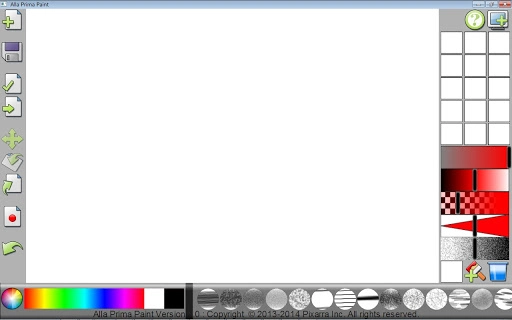
Description
Natural Media Digital Painting Made Simple
Overview
Ala Prima Paint is a digital painting tool designed for artists seeking a natural media experience without complex workflows. Built with a focus on immediate creative expression, the software enables users to load multiple colors directly onto their brush with a single click. This approach streamlines the process of blending and layering, allowing for spontaneous painting sessions ideal for quick studies, concept sketches, and idea exploration. The free version is fully functional, offering access to core painting features while restricting certain brush types. Target users include digital artists, illustrators, and hobbyists who value intuitive design and fast results. The software is optimized for both Windows and Mac platforms, making it accessible to a broad audience of creative professionals and beginners alike. Real-world applications include on-the-go sketching, rapid prototyping of visual concepts, and experimenting with color combinations. The developer, Alla Prima Software, emphasizes simplicity and artistic freedom in its design philosophy.
Key Features & Capabilities
- One-click color loading: Users can apply multiple colors to a brush in a single action, enabling dynamic mixing and layering directly on canvas.
- Intuitive brush behavior: The software mimics natural media, allowing realistic brush strokes with immediate visual feedback.
- Flexible dab styles: A range of dab styles supports varied textures and effects, enhancing creative expression.
- Full functionality in free version: Core painting tools are available without limitations, though some advanced brushes are locked.
- Quick painting workflow: Designed for single-sitting sessions, ideal for studies, thumbnails, and brainstorming.
These features empower artists to experiment freely, mixing red with yellow pastel or combining red, blue, and cyan strokes in a single motion. The tool supports rapid iteration, making it well-suited for concept development and visual ideation. Artists can explore color relationships and texture variations without navigating complex menus or settings. The focus on immediate results reduces friction between idea and execution, encouraging spontaneous creativity.
User Interface, Workflow & Performance
The user interface is designed for minimal distraction, placing essential tools within easy reach. Navigation is straightforward, with brush selection, color palettes, and canvas controls arranged logically. The workflow prioritizes speed and simplicity, aligning with the software’s goal of enabling quick painting sessions. Users can begin painting almost immediately after launching the application. The developer did not specify resource usage details, but the 200 MB installation size suggests a lightweight footprint. Performance observations are based on general software behavior patterns. Stability is expected to be consistent given the focused feature set and absence of background processes. The interface remains responsive during active painting, supporting smooth brush movement and real-time color blending. No known performance bottlenecks were reported in the provided information.
Compatibility & System Requirements
Ala Prima Paint is compatible with both Windows and Mac operating systems. The software version is 1.0.0, with a file size of 200 MB. Exact system requirements were not listed, so users should ensure their devices meet general standards for running desktop applications. Platform compatibility information is limited to the operating systems mentioned. The developer did not provide additional system requirements. Installation is straightforward, with no known dependencies beyond standard OS functionality. Users should verify their system's ability to run modern desktop software before installation.
Pros and Cons
Pros
- Intuitive one-click color loading for fast, natural media effects
- Free version offers full access to core painting tools
- Optimized for quick, single-sitting creative sessions
- Lightweight installation at 200 MB
- Available on both Windows and Mac platforms
Cons
- Some advanced brushes are locked in the free version
- No detailed system requirements provided
- Performance data not specified
- Limited information on update frequency or support
- Exact resource usage (CPU/RAM) not disclosed
FAQ Section
Is Alla Prima Paint available for both Windows and Mac?
Yes, the software is compatible with both Windows and Mac operating systems.
Is the free version fully functional?
Yes, the free version includes all core painting features. Some brush types are restricted but the core functionality remains unrestricted.
Does Alla Prima Paint require an internet connection?
The software does not require an ongoing internet connection for basic painting tasks. However, updates may require connectivity.
How often are updates released?
Update frequency was not specified by the developer. Users should check the official site for the latest version.
What license type does Alla Prima Paint use?
Ala Prima Paint is distributed under a free license, with no cost for use or download.
Final Thoughts
Ala Prima Paint delivers a refreshingly simple approach to digital painting, focusing on immediacy and creative freedom. Its one-click color loading system removes friction from the painting process, making it ideal for artists who want to capture ideas quickly without technical overhead. The free version’s full functionality ensures that users can explore the core experience without limitations. While some brushes are locked, the available tools are sufficient for sketching, studies, and concept work. The lightweight design and cross-platform availability enhance accessibility. For digital artists seeking a natural media feel with minimal setup, this software stands out. Its emphasis on spontaneous creation aligns with modern workflows that value speed and intuition.
Download Alla Prima Paint now
Guides & Tutorials for Alla Prima Paint App for Chrome
How to install Alla Prima Paint App for Chrome
- Click the Preview / Download button above.
- Once redirected, accept the terms and click Install.
- Wait for the Alla Prima Paint App for Chrome download to finish on your device.
How to use Alla Prima Paint App for Chrome
This software is primarily used for its core features described above. Open the app after installation to explore its capabilities.
User Reviews for Alla Prima Paint App for Chrome 0
No reviews found





